 The Ticket Log

HubSpot Service Hub: review in progress
Pricing and key facts
| HubSpot Service Hub | |
|---|---|
| Starting price | $7 per seat/month billed annually, Starter new-customer price (list $20) Source, checked November 16, 2026 |
| Pricing model | Per seat, per month. View-only seats are free. Source, checked November 16, 2026 |
| Free plan | Yes, up to 2 users, with HubSpot branding Source, checked November 16, 2026 |
| Free trial | None listed for Service Hub Source, checked November 16, 2026 |
| Paid plans | Starter from $7 (list $20), Professional $90, Enterprise from $150 per seat/month Source, checked November 16, 2026 |
| Channels on the entry plan | Email, live chat, Facebook Messenger and calling (500 minutes). WhatsApp needs Professional. Source, checked November 16, 2026 |
| AI | 500 HubSpot Credits a month on Starter. Customer Agent uses 50 credits ($0.50) per resolution. Source, checked November 16, 2026 |
| Worth knowing | Professional has a required one-time $1,500 onboarding fee. Enterprise is $3,500. Source, checked November 16, 2026 |
Priced for your team
The cheapest HubSpot Service Hub plan that covers what you tick, from HubSpot Service Hub's own pricing page (checked November 16, 2026).
Open this in the full calculator to add AI costs, see every plan side by side, or compare with a help desk you already use.
Plan by plan
Every plan from each company's own pricing and plan pages, checked November 16, 2026. Click any feature to see where it came from. Already using HubSpot Service Hub? The help desk calculator shows what switching would cost and change.
| Free | Starter | Professional | Enterprise | |
|---|---|---|---|---|
| Price | Free up to 2 seats | $20 per seat a month | $90 per seat a month yearly, $100 monthly | $150 per seat a month, yearly only |
| Included 1 shared inbox | Included 1 shared inbox | Included 100 inboxes | Included 200 inboxes | |
| Live chat | Included With HubSpot branding | Included | Included | Included |
| Phone (built in) | No Via VoIP integrations | Included 500 minutes a month, 1 number | Included 3,000 minutes a month, IVR | Included 12,000 minutes a month, IVR |
| SMS | No Add-on for Professional and up | No Add-on for Professional and up | Add-on $75 a month, US and Canada | Add-on $75 a month, US and Canada |
| No Professional and up | No Professional and up | Included 1,000 messages a month | Included 1,000 messages a month | |
| Facebook or Instagram messages | Included Facebook Messenger | Included Facebook Messenger | Included Facebook Messenger | Included Facebook Messenger |
| Public knowledge base | No Professional and up | No Professional and up | Included 1 knowledge base | Included Multiple knowledge bases |
| Automations | No Form-based ticket triage only; workflows start at Starter | Included 50 workflows, limited triggers | Included 300 workflows | Included 1,000 workflows |
| SLA policies | No Professional and up | No Professional and up | Included | Included Includes conditional SLAs |
| Custom reports | No Standard dashboards | No Standard dashboards | Included 100 custom reports | Included 500 custom reports |
| AI agent for customers | No Rule-based bots only | No Customer Agent is Professional and up | Included 50 credits per resolution; 3,000 credits a month included | Included 50 credits per resolution; 5,000 credits a month included |
| AI help for agents | Included Breeze Assistant; reply drafts are Professional | Included Breeze Assistant; reply drafts are Professional | Included Reply drafts and summaries | Included Reply drafts and summaries |
| Worth knowing | Free for up to 2 users. HubSpot branding on chat. | List price $20 a seat. New customers are offered $7 a seat; the page doesn't say for how long. | Plus a required one-time $1,500 onboarding fee. Customer Agent uses 50 credits ($0.50) per resolution; 3,000 credits a month included. | Billed yearly. Plus a required one-time $3,500 onboarding fee. 5,000 credits a month included. |
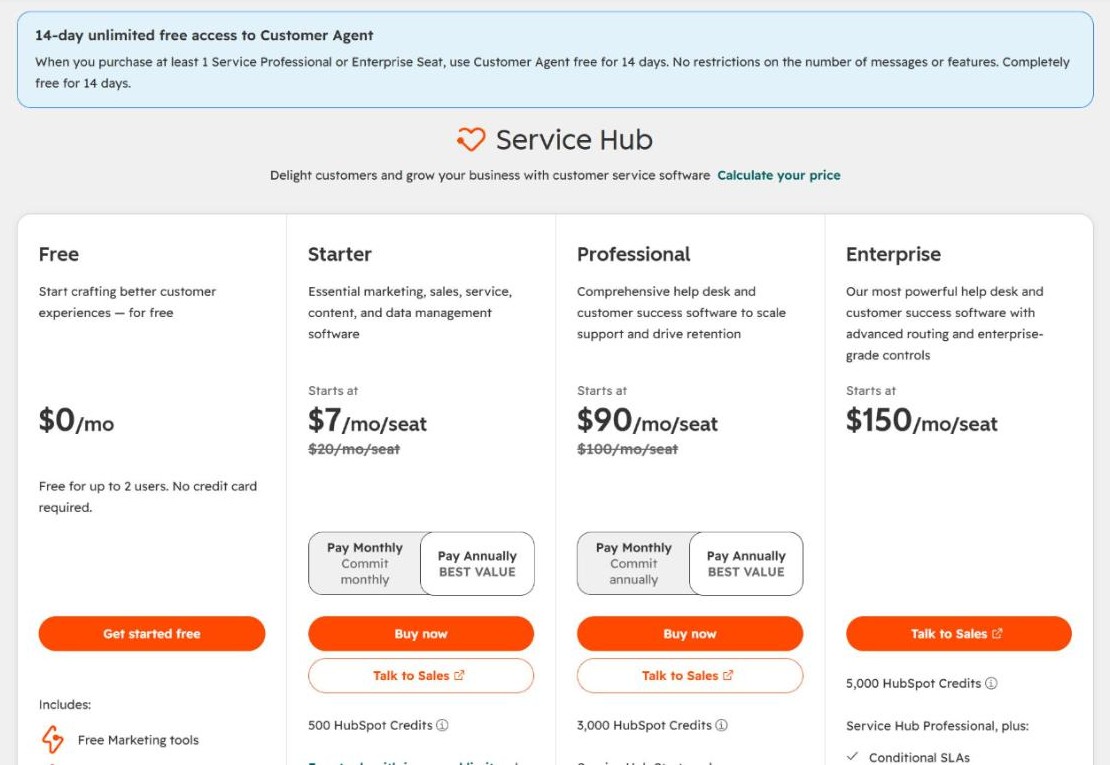
Pricing page
Captured from the vendor's site so you can see the prices the table above comes from. Screenshots from my own testing will go here once I've reviewed it.
Moving to or from HubSpot Service Hub
What HubSpot Service Hub can bring in from your old help desk, and what you can take with you if you leave. From HubSpot Service Hub's own help pages, checked November 16, 2026.
Bringing your data in
| Built-in importer | Yes Smart Transfer, a one-time move from supported apps, plus CSV import |
|---|---|
| Imports from | Zendesk, Freshdesk; knowledge bases from Zendesk, Freshdesk, Help Scout and Intercom; CSV for others |
| Past tickets | Yes From Zendesk and Freshdesk, with comments, once; or CSV |
| Contacts | Yes Contacts and companies, or CSV on any plan |
| Knowledge base articles | Yes By URL or CSV, 400 per import; Professional and up |
| Saved replies or macros | No Not on Smart Transfer's list of data types; rebuild as snippets |
| Automations | Yes From Zendesk only, through Smart Transfer |
| Custom fields | Yes Needs a separate Data Hub subscription |
| Cost of importing | Varies Smart Transfer and CSV on all plans; custom fields need Data Hub; knowledge base import needs Professional |
| Help from the company | Self-serve; HubSpot's paid data migration service doesn't list help desks |
| Migration tools it recommends | None named on HubSpot's help pages |
Taking your data out
| Tickets | Yes CSV or Excel of ticket properties on any plan; conversation text not stated |
|---|---|
| Contacts | Yes CSV or Excel on any plan |
| Knowledge base articles | Yes CSV or Excel; Professional and up |
Worth knowing
Billing and contract terms
What you agree to when you sign up for HubSpot Service Hub, in plain words. From HubSpot Service Hub's own billing help and terms, checked November 16, 2026. Your contract wins if it says something different.
| Pay monthly | Yes Starter can commit monthly; Professional and Enterprise need a yearly commitment, though you can pay monthly |
|---|---|
| Discount for paying yearly | About 10% on Professional ($90 vs $100) |
| Card needed for the trial | Not verified A 14-day trial is offered; HubSpot doesn't say whether it needs a card |
| Cancelling a monthly plan | Turn off auto-renewal; it ends at the end of the commitment, not right away |
| Cancelling a yearly plan | No early exit, even if you pay monthly |
| Refunds | None for prepaid or unused time |
| Removing seats when someone leaves | From the next billing period, never below your plan's minimum |
| Adding seats | Anytime, at your tier's current rate |
| Moving to a cheaper plan | Only at renewal; ask 5 business days before |
| Renews automatically | Yes Turn it off in billing settings before the renewal date |
| Notice before price rises | At least 30 days notice |
| Your data after you cancel | Drops to free tools; export first, as paid data like workflows goes after 90 days |
Before you sign
Questions people ask
Answered from the published pricing and plans. Each answer links to where it came from.
How much does HubSpot Service Hub cost?
The entry plan is $7 per seat/month, billed annually, Starter new-customer price (list $20). All plans: Starter from $7 (list $20), Professional $90, Enterprise from $150 per seat/month.
Source, checked November 16, 2026
Does HubSpot Service Hub have a free plan?
Yes, up to 2 users, with HubSpot branding.
Source, checked November 16, 2026
What channels does the cheapest plan include?
Email, live chat, Facebook Messenger and calling (500 minutes). WhatsApp needs Professional.
Source, checked November 16, 2026
How does HubSpot Service Hub charge for AI?
500 HubSpot Credits a month on Starter. Customer Agent uses 50 credits ($0.50) per resolution.
Source, checked November 16, 2026
HubSpot Service Hub alternatives
Zendesk

Freshdesk

Help Scout
Update history
- November 16, 2026: Checked pricing, plans, channels and AI costs on HubSpot Service Hub's own site, and captured the pricing page.